音頻切換器接線教學:3.5mm怎麼接才順?✅
如果你曾經遇過「接上去沒聲音、切換後聲音忽大忽小」的狀況,多半不是切換器壞了,而是接線方向或輸入輸出模式選錯。這篇我用最生活的方式,整理 3.5mm音頻切換器 的接線步驟,並把 2進1出/1進2出 與 一鍵靜音按鈕 的使用時機講清楚。
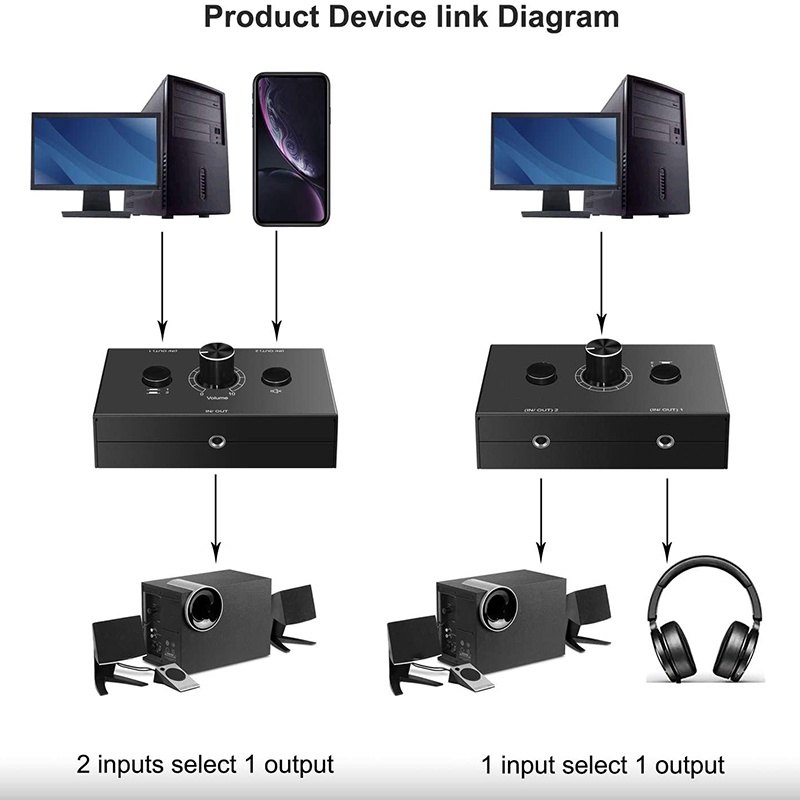
先確認你手上的模式:2進1出還是1進2出?
你可以把它想成「幾個裝置要進來、最後要去哪裡」。
- 2進1出:兩個音源進來,只有一個輸出端。
- 1進2出:一個音源進來,分到兩個輸出端。
如果你不確定,回想你桌面是「喇叭固定、音源輪流」還是「音源固定、輸出想分配」。選對模式,後面就會順很多。
2進1出接線步驟(最常見的桌面配置)
情境:電腦與手機都要接到同一組喇叭。
- 把喇叭的 3.5mm 線接到切換器的輸出端。
- 把電腦的 3.5mm 音訊輸出接到切換器的輸入端1。
- 把手機的 3.5mm 音訊輸出接到切換器的輸入端2。
- 開啟電腦或手機其中一個,先把音量調到安全範圍。
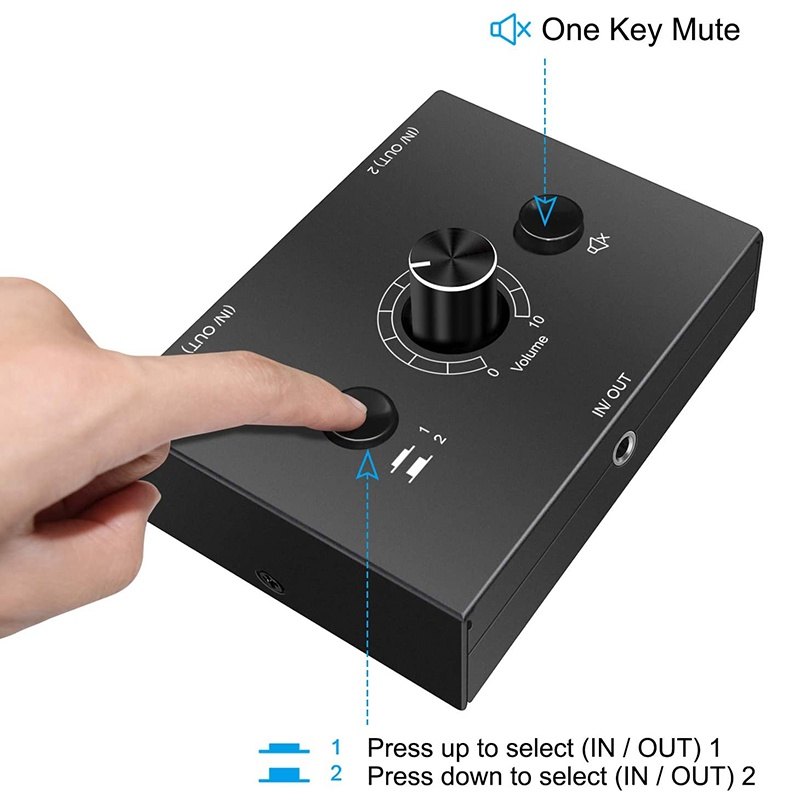
- 按切換鍵,確認聲音會切到對應來源。
如果你切換後沒有聲音,先檢查裝置端是否有把音訊輸出切到耳機/外部喇叭(有些裝置會自動切換)。
1進2出接線步驟(同一來源分到兩個輸出)
情境:同一台電腦同時接喇叭與耳機,想要快速切換。
- 把電腦的 3.5mm 音訊輸出接到切換器的輸入端。
- 把喇叭接到切換器的輸出端A。
- 把耳機接到切換器的輸出端B。
- 播放音樂後按切換鍵,確認聲音會導到你要的輸出。
這種配置的重點是:你要先決定「你想用哪個輸出」,切換器會把訊號導到對應端。
一鍵靜音按鈕怎麼用才不尷尬?
我會把靜音鍵用在兩種情境:第一是通話或會議時需要快速停聲;第二是你正在播放但想暫停一下,避免音量突然變動。因為靜音是針對輸出端做暫時中斷,所以通常比你在裝置端反覆調音量更快更穩。
原理說明(生活版):可以把它想成「音訊的暫停閘門」。當你按下靜音,切換器把輸出端的聲音先關掉或降到接近靜音,等你再按回去,聲音就恢復到原本的播放狀態。
帶有依據感的檢查清單:遇到沒聲音先看這些
- 模式是否對:2進1出接喇叭輪流音源;1進2出接同一來源分到兩輸出。
- 裝置端輸出設定:有些系統會把聲音輸出切到耳機或其他裝置。
- 音量落差:不同裝置輸出音量不同,切換前先把音量調安全。
- 接頭是否插到底:3.5mm 接頭鬆一點就可能導致聲音不完整。
如果你有類似需求,可以進一步看看這類商品的規格與評價
你可以把這篇當作接線地圖。當你確認模式與端口後,再對照商品頁的介面標示與使用者回饋,通常就能更快完成設定。
3.5mm音頻切換器的價值在於把「音源管理」變簡單。只要先選對 2進1出/1進2出,再照著步驟接好,搭配一鍵靜音,你的桌面就能更乾淨、操作也更直覺。
💡 原理小知識
許多日常用品其實背後都有基本的運作邏輯,例如透過密封、隔離或結構設計來提升效率。可以想像成把原本分散的影響因素集中管理,因此在實際使用上會更穩定。
English Version
How to Wire a 3.5mm Audio Switcher Without Confusion: 2-in-1-out / 1-in-2-out Setup + Mute Tips
The hardest part of a 3.5mm audio switcher is often not the device itself, but figuring out the correct wiring. This tutorial walks you through common connections for 2-in-1-out and 1-in-2-out setups, plus practical guidance for using the one-button mute. It also explains the switching idea in everyday terms so you can finish your desk setup quickly.
Step 0: Confirm whether you have 2-in-1-out or 1-in-2-out
2-in-1-out takes two audio sources into one output. 1-in-2-out takes one source and sends it to two outputs. If you remember what stays fixed on your desk—output device or audio source—you’ll choose the right mode faster.
2-in-1-out wiring steps (PC + phone to one speaker)
Connect the speaker to the switcher’s output. Then connect PC to input 1 and phone to input 2. Turn on one device at a time, set a safe volume, and press the switch button to confirm the audio routes correctly.
1-in-2-out wiring steps (one PC to speakers + headphones)
Connect the PC to the switcher’s input. Connect speakers to output A and headphones to output B. Play audio and switch to route sound to the output you want.
How the one-button mute works (simple explanation) + troubleshooting
Mute acts like a quick gate on the output signal—press to temporarily stop or greatly reduce sound, press again to resume. If you get no sound, check the mode, the device’s audio output setting, and whether the 3.5mm plugs are fully seated.